Wednesday, June 20, 2012

SQLite: how to get started with extensions

Preface


As part of a series of blogs I need to release detailing my work at CDOT, this will focus on how to build your own c extension to the hugely popular tiny and fast database engine.

As part of my project to build an SQLite adapter for NexJ's open health framework. We've needed to extend the out of the box functionality for SQLite, this ranges from hacking at java code to hacking at our JDBC to hacking SQLite extensions to hacking the SQLite source itself.

So this post will go over what you need to do to write your C extension and more importantly how to load it.


The Minimum


Let's lay down the groundwork at a minimum you need to refer to SQLite's C api, there you'll see the publically visible utilities you'll use for your extension.

Specifically lets look at creating our own SQL function, this means that it will be usable during queries and other activities. For this you'll need to take a look at: create function, the rest of the green code should be the boilerplate code for loadable extensions where "sqlite_extension_init()" is the entry point that the SQLite api knows about.


This is the most basic loadable extension you can make, now to tackle the problem of loading it:

First compile this c file into a dll for your current system, I suggest you look up how to do this based on what compiler you're using.

Second assuming we have binary.{dll | so | ... }, there are two ways to load your extension inside an SQLite shell you can call .load filename OR using SQL you can run this query select load_extension('filename').

And its that easy! Reference this page for SQLite's loadable extension documentation.

Lastly there is a third way to include your extensions, this will be detailed more when I release a blog post about our build system. However the very basics are to add


during SQLite's initialization, in our version of SQLite this is added after SQLite loads its internal functions in main.c by putting this line in addition to adding the extension location to the existing build system.


An Example


Finally here is example source for our extension that creats the SQL function binary, that works with the existing SQLite function hex(). Binary converts hex string input into blob output.

Take not of the how to handle input errors and other unexpected errors

https://bitbucket.org/gbatumbya/sqlite/src/9cc68159218e/ext/nexj/sqlitext.c#cl-29

Back To CDOT - My trip and my goals

The Trip

So I've been gone for the month of May, I took advantage of the opportunity of being able to get a month off of my coop and CDOT work. I left with 3 long time friends for a backpacking trip across as many countries as I could and to see as many things as I could.

While I was gone I visited 5 countries around western europe, a brief itenary or the trip went as follows: 

  • London 
    • London -> Paris via train 
  • Paris 
    • Paris -> Lisbon via plane 
    • Lisbon -> Lagos via train 
  • Lagos 
    • Lagos -> Lisbon via train 
  • Lisbon 
    • Lisbon -> Madrid via plane
  • Madrid 
    • Madrid -> Barcelona via train 
  • Barcelona 
    • Barcelona -> Nice via car 
  • Nice
    • Nice -> Paris via train 
    • Paris -> Home 

I cannot say enough good things about this trip, I also cannot say enough good things about staying in hostels. While an entire blog post can be written on how to choose the right hostile at the very least take advantage of sites dedicated to finding and reviewing hostels. This one in particular was our favourite HostelBookers.
Lagos, Portugal

I'm not going to go into detail about the trip, I could go on forever, there are 32gb of pictures and videos to go through so here is one of my favourites to the left.


CDOT


I've been back for 2 weeks now, and its taken a while to get my barrings back. Getting back to CDOT has put three projects in front of me.

To change topics a bit, some of my personal goals upon coming back have been to refocus on the tasks I have at hand and become better at time management by more strictly budgetting myself. Additionally, alot of pressure is mounting on Grace's exit and I will have some large shoes to fill. Coming back has re ignited my focus, trying to learn everything that Grace knows is a challenge of knowing the right things to ask and recording all the things that happen during our pair programming.

On the topic of projects, we are currently working on a SQLite database adapter for NexJ's open health framework. Since I've come back it has gone in for code review and we are still in talks with NexJ about making a final deliverable. I hope to have this done in the following month, the final deliverable should have a multi-platform build system for our driver in adapter to the adapter code.

Another project is for NexJ and it is something that no one really knows anything about, I have tried my best to research the components that seem relevant. Really though, the final step is for me to compile my prelim research of limitations in the proposed software until more defined specs come in.

Finally my old friend BerrySync or Sync for the Blackberry. While it was amazing that we finished it so quickly last year, it is not a perfect product and it is littered with problems. I should have some time to focus on certain performance and caching issues, hopefully people will stop hating on the app in BlackBerry's market. Additionally I might need to look into Blackberry OS capabilities. I'm budgeting 2 - 3 weeks of full time work to solve these issues if time allows.

Thursday, August 4, 2011

BerrySync: Fetcher.java, now with more github

after a little bit of work ironing out the BerrySync app. Ive shlapped together my synchronization service library. I've dubbed it fetcher.java, now on github.


My Design

I created the library to be as modular as I could, I'm not happy with the results yet but this is the first step after all.

The Fetcher class is a singleton and in order to be used it requires a service to be set, this service must be of the iFetcher interface. That allows me to hotswap or customize the service that I'm using.

On top of that each service can have a different structure or set of needs, so attached to the iFetcher interface are setters for the seperate modules:
  • Encryption module
  • Json decoding module
  • Network connector module

This Release

 I've implemented the bare minimum required steps for FireFox's Sync service. My chosen platform was BlackBerry(obviously), and as a result the modules contain platform specific code. Meaning that different modules will need to be created to port this service to different platforms.


What Can I Do?

Fetcher.getInstance().setLogin("asdf","asdf","asdf").pull();
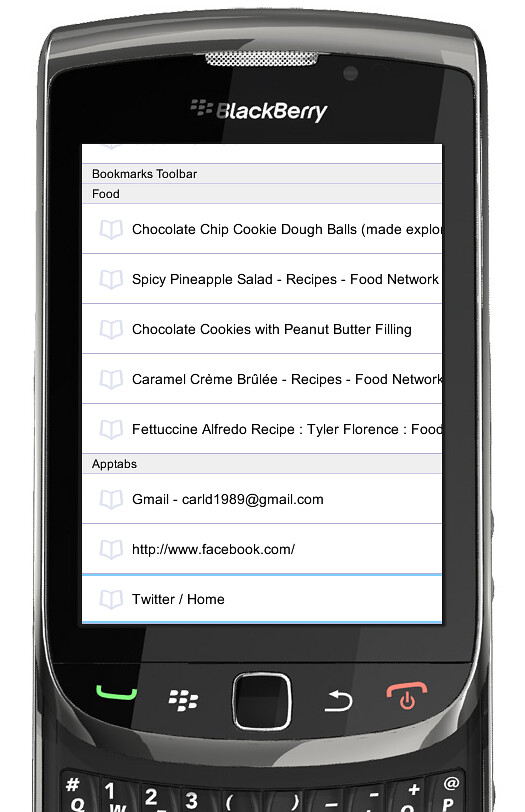
< This screenshot is the alpha visual representation of data pulled by Fetcher >
1,  2.


Thursday, July 21, 2011

BerrySync: Untested code is broken code

TLDR - What did I learn?

In the irc channels I lurk, a phrase reigns true. "Untested code is broken code". I overlooked this bug because my tests didn't keep up with the code. Don't be lazy, you will not remember you took short cuts a month ago.


BerrySync's Show Stopper
 
So I'm very quick to point fingers, So naturally when our program stops decrypting 75% of the I went straight to http://bit.ly/r9vKFS. You should note RIM is abiding by this document http://bit.ly/ey4Fg and if you read further down you'll note that this algorithm padding standard does not mention AES encryption which is tragic because its the only symmetric key unformatter engine that RIM supplies, meaning you'll need it for AES encryption! For example BerrySync's crypto module sans error control:

AESKey key = new AESKey(keyData);
InitializationVector iv = new InitializationVector(ivData);
ByteArrayOutputStream outputStream = new ByteArrayOutputStream();
BlockEncryptor encryptor = new BlockEncryptor(
     new PKCS5FormatterEngine(
          new AESCBCEncryptorEngine(key, iv)), outputStream);
encryptor.write(plainText);
encryptor.close();
outputStream.close();
return outputStream.toByteArray(); 

I And you should check out http://bit.ly/rplM0s. Here you'll see that Mozilla is abiding to http://bit.ly/piPqcJ. The 2.1 standard includes AES encryption in the spec, hold on a minute. RIM must be doing something totally off the wall here. All of that combined with the knowledge that using third party and unlicensed encryption and getting your app into AppWorld would involve many headaches and much money ala ECCN.


Wrong

As with most things my finger pointing was wrong, the bug actually lived on this line
data = data.replace('-', '\0'); 
Where my lazy attempt at removing characters from a string totally backfired. The interesting thing is that during rare cases, my sync account and about 25% of others tested it didn't actually make a difference and everything worked as intended. Where the other 75% of accounts saw a Bad Padding Exception during decryption.

Wednesday, July 6, 2011

BerrySync: How fetcher gets it done, thread pooling

A Little Bit Of Background
I designed My fetcher library to have modules, these house the logic for the various steps I would need to perform. The fetcher itself links up the modules and goes from a url to a usable object for BerrySync.

One of the more troublesome modules was the Smuggler, I originally designed smuggler to do the network scheduling for fetcher then Smugglers worker thread would perform the actual connections, making the operation non-blocking(which is important for a good user experience!).

Now
I was forced to change the design, because the data parsing and decryption had to moved off the main thread. To facilitate this I gave Fetcher its own internal work Queue, with the smuggler still scheduling the network connections this time using Fetchers new and improved .invokeLater(runnable r) method!


public void invokeLater(Runnable work){
_queue.enQueue(work);
}
private final class WorkQueue {
        private Node _head;
        private Node _tail;
        private QueueWorker[] _worker;
        public WorkQueue(){...} 
        public synchronized void enQueue(Runnable data) {...}
        private synchronized Runnable deQueue() 
throws InterruptedException{...}
        private final class QueueWorker extends Thread {
            public void run() {
                Runnable work = null;
                while (true) {
                    try {
                        work = deQueue();
                        work.run();
                    }
                    catch (InterruptedException ignored) {}
                }
            }
        }
    } 

I'm using the runnable interface to formalize how this thread can 'run' your work. The commented out methods just show a simple queue linked list data structure.

Tune In Next Time
In the next instalment I'll tell you all about how I'm tracking down an elusive decryption bug with sync data on the BlackBerry!

Wednesday, June 22, 2011

BerrySync: Launching Opera mini xor BlackBerry's Native Browser

An important part of BerrySync will be actually opening up URLs in the browser(s) on your BlackBerry.
After doing a little research I worked out how to not only open the native browser but third party browsers as well.

Opening Native Browser

browserSession = Browser.getDefaultSession();
browserSession.displayPage("http://www.BlackBerry.com");
browserSession.showBrowser(); 

Wasn't that painless and easy?

Opening 3rd Party Browsers, Opera Mini in this case
Also worthy of note is that fact that this block of code doesn't stop at just browser, you can invoke any third party app by replacing "Opera Mini" or making another if clause. See below or Pastebin.

int[] apps = CodeModuleManager.getModuleHandles();
ApplicationDescriptor[] ad;
ApplicationDescriptor holder;
String[] args = {"google.com"};
for(int i = 0, len = apps.length; i < len; i ++){
    ad = CodeModuleManager.getApplicationDescriptors(apps[i]);
    if(ad != null){
        for(int j = 0, adlen = ad.length; j < adlen; j++){
            if(ad[j].getName().equals("Opera Mini")){
                holder = new ApplicationDescriptor(ad[j], args);
                try {
                    ApplicationManager.getApplicationManager().runApplication(holder);
                    break;    //Needed
                } catch (ApplicationManagerException failedToOpen) {}
            }
        }
    }
} 


Code Walkthrough
This code scans through all installed modules on a BlackBerry, it tries to get the application descriptor on each and verifies it against the name of the app you wish to run. The args step is optional, but for our purposes we want to open Opera and goto the specified URL. Lastly the break is needed to stop multiple instances of the app opening since I found that many apps had more then one matching application descriptor

Wednesday, June 15, 2011

BerrySync: How does Firefox Sync use cryptography

I have a blog post explaining how to get FireFox Sync JSON, just having that encrypted JSON isn't enough. So what now?

Sync's Cryptography

When we started work, I used this blog to identify and determine how sync was using expecting it's clients to implement cryptography.

However some issues come along with not understanding cryptography and having never had to use it before, Sync updated and simplified their model in 1.6 and only today with a lot of help from moznet's #sync channel I got a usable understanding of the implementation. Here goes it:

Decrypting the Sync JSON:

There are a few assumptions in you should expect to handle Sync's data.

All of the keys are symmetric which means, one key that can perform both encryption and decryption. These keys are 256 Bit AESKeys used in a mode that requires Initialization Vectors.

Additionally all of Sync's keys have a paired hmac and this is used to verify what you're decrypting is what was encrypted so you should verify each object before decrypting it.

And lastly all JSON received from the server is Base64 encoded and needs to be decoded to be used.
  1. Generate the decryption key's bytes and its hmac bytes from the account's sync key
  2. Create a 256 bit AES Key from the bytes in step 1, along with the Initialization Vector on the crypto/keys object
  3. Decrypt the crypto/keys cipher with the key made in step 2. This reveals a base64 encoded key and hmac pair
  4. Assuming you have a users tab collection object (from a previous post), use the key bytes from step 3. and the specific tab object's Initialization Vector to create another 256 bit AES Key
  5. Decrypt the tab objects payload with the key made in step 4.
  6. Profit!

BerrySync: Firefox Sync's JSON urls

I've been working on BerrySync for just over a month now. We've gotten a lot closer to obtaining usable Firefox Sync data, just an update: yesterday I implemented Sync's credential expectations, and last week we determined the url semantics and got a trivial HTTP connector with a work queue implemented on the BlackBerry. 

Getting the Sync JSON:

  1. With the user's account info, create their sync username: http://bit.ly/mkoeRx
    1.  If it's an old sync account there account name becomes the username
    2. New accounts are emails, which need:
      1. Lowercase it
      2. SHA1 digest it
      3. Base32 encode it
      4. Lowercase it again
  2. GET request http://auth.services.mozilla.com/user/1.0/syncUsername/node/weave
    1. This returns your weave server's address.
  3. GET request weaveServer/1.1/syncUsername/storage/crypto/keys
    • Example Url from Sync 1.1 API
    • All weave node requests will require your syncUsername and account password for authentication
    • This returns a JSON specified here
So I have this implemented in our application BerrySync, currently it's encrusted with RIM libraries and not a library itself, just a workable class that contains a stack of url's which a worker thread plows through returning the results asynchronously.

Giving Back

I intend to package this HTTP connector built in Java as an open source library, hopefully it will contribute to Firefox Sync's third party ecosystem!

Tuesday, June 7, 2011

BerrySync - Unit Testing in Blackberry Apps

Pains
Building Berrysync from the ground up hasn't come without it's challenges. Most notably as of recent has been our incorporation of test driven development, for many people that brings JUnit to mind. To my surprise JUnit without including its dependencies will not natively run on the BlackBerry Java core, and even more interesting is the fact that JUnit comes bundled in the BlackBerry Developer Eclipse!

Thanks to some googling and blog posts lost in my browser history I came across this awesome tool called BUnit. It seems to be the only reliable way to unit test inside a BlackBerry app.

Using BUnit in Your Project
You'll need to define an alternate entry point to your application and add some logic to the App's entry point, here are the steps:
  1. In BlackBerry_App_Descriptor.xml -> click Alternate entry points
  2. Click add provide a name, click ok
  3. Click on what you just added and provide an Application Argument and/or an icon
  4. Open MyApp, and provide this logic (eg. Application Argument = bunit)

    public static void main(String[] args){
        if (args != null && args.length > 0 && args[0].equals("bunit")){
            TestRunner tester = new TestRunner();
            tester.enterEventDispatcher();
        }else{
            MyApp theApp = new MyApp();       
            theApp.enterEventDispatcher();
        }
    }


Two entry points allows this, where BerrySync is our application and B-unit is the unit tester


Tips On Usage
Now I assume the limitations of BUnit and the major benefits of JUnit come from java Reflection. Which you guessed it, isn't included in the BlackBerry JRE. Sooo much to my disappointment in each test suite you need to manually specify the number of tests, and later on invoke them in a switch. On top of that you'll need to add your suites to runner manually.

A snippet of my test suite: http://pastebin.com/mq9QzpkW


I also had to add a few Assertion functions, graciously BUnit provided the file to place them in.

assertEquals(String test, byte[] expected, byte[] actual)
assertNotEquals(String test, byte[] expected, byte[] actual)


here they are too! http://pastebin.com/H3R69XC6

ScreenShot
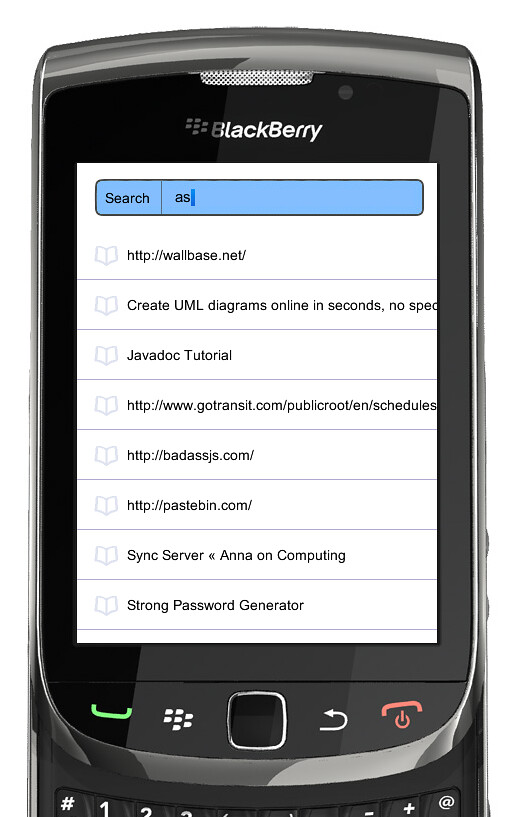
<- Berrysync's unit tester running as is

Friday, May 13, 2011

BerrySync - Fifefox sync crypto, a step closer

BerrySync
To make a BerrySync compatible with FireFox Sync we need understand how sync connects to its servers. There are two challenges for me so far. First I opted to emulate sync's encryption steps  on the BlackBerry in Java, next I need to make a make a custom sync server and start talking to it before I start talking to the real thing.


FireFox Sync Crypto
So in order to even make sense of the data I'm getting back from the Sync Server I need to know what to do with it! I'm going to break down how I've understand Sync is expecting this to be handled.

  • When you sign up Sync makes a RSA 2048 bit key pair, that's whats used to encrypt during travel, I've been doing my reading here.
  • Decrypting
    1. Decrypt Weave Object with your private key
    2. Decode Base64 Weave payload to binary
    3. Decrypt payload binary with AES 256 bit key and 16 bit Initialization Vector, these are found in the Weave object
    4. Profit from here
Normally you would use Sync's client JavaScript to take care of this, however I attempted to port this to Java on the BlackBerry. Check out my encryption equivalent attempt of steps 2 and 3 here.Thankfully these algorithms are standardized and RIM's crypto library has had exactly what I've needed to far. I still need to confirm how BerrySync is going to handle the RSA keypair.


FireFox Sync Server
I'm at the point where I should start looking for my own custom firefox sync server, Seneca may have one. I was also going to set up one on my laptop this weekend using these:


So basically my goal for next Friday is to have access to a custom FireFox Sync Server and to iron out how BerrySync is going to handle the RSA key pairs. I want to be able to talk to a production Firefox server during the coming week!

Friday, May 6, 2011

hello cdot! - BerrySync

My first week at CDOT, Seneca's Center for Developing Open Technology is coming to a close and there have been some wicked developments.

The Atmosphere
I'm really enjoying working here as a summer student. The orientation was welcoming, bundling in breakfast and lunch. That day all of the summer researchers were gathered together and given the history of CDOT as well as their expectations for the summer.

Respective project heads gave brief speeches about what their teams would be working on this summer, my project in particular ill mention farther down.

Every morning teams meet up for scrums where you briefly talk about what you didn't yesterday and your goals for today. I'm really enjoying these, it helps everyone keep in touch with the cool projects going on here and it also allows people to offer advice before it even hits IRC.

Speaking of IRC, we are all expected to be there. The name of the game is, be involved. Your knowledge can help people and the knowledge of your community is at your figure tips.

My Project
Creatively named BerrySync the short description is that, we aim to develop a enterprise product roughly equivalent to Firefox Home for the iPhone, except for the BlackBerry.We aren't promising a copy of the feature set nor are we limiting ourselves to Home's feature set, Home is a guideline. Similarly were investigating the interaction of FireFox Sync for integration and perhaps in the near future customization.

So this first week, I've been setting up my environment and figuring out what I need research in depth. I just got my computer and my dual boot is installing as we speak. I'll post again with updates on my current task / demo / I'm a learner by doing.

Friday, April 22, 2011

Sundae - 1.0 - XB-pointstream and other unfinished business

My usual rant: Sundae is a canvas reference tester library built in Javascript. My goal is get Processing.js, c3dl, and XB-pointstream to use this tool, but that's just the start who knows what else.

Since we only care about links, eat your hearts out.


Sundae

1.0 is done I guess I can breathe a sigh of relief, not.

In my last post I went on and on about this thread pool manager, it wasn't until yesterday I found a major bug, where finished workers were never set to available. The answer was more closures! I needed to keep a local reference of itself, within its onmessage, see it here.


XB-PointStream

After a few stressful hours before I moved out of my house @ York university. Andor Salga and I were hard at work debugging Sundae to work with XB-PointStream. Eventually there was a light at the end of the tunnel, things clicked, my threads lined up and THAT round of bugs was ironed out. Library goal 1, reached. 2 more at Seneca to go.


Whats new with Sundae?
  • Error messages displayed in console on malformed test cases
  • Thread pooler actually works now!
  • Added known fail, counts as a pass
  • Added a progress counter
  • Added some pretty buttons on the page
  • Blurring doesn't cause strange artifacting anymore
  • 3D canvases compared properly, this one was a doozy


OSD700 comes to an end

This has been my favourite and most challenging course to date, the concept of open source technology to a student was so foreign. We're encouraged to take what others have done before us and put our spin on it, in a world where you hear the doom and gloom of academic dishonesty every semester. David Humphrey, Seneca's resident open source teaching bad-ass was inspirational and insightful as ever throughout my experiences in this course. I don't think I'll ever part from open source development after being introduced to the its world. Even if programming stops being a career it's now always a hobby.

Contribute Input

Monday, April 18, 2011

0.9 - Sundae - Gets buff - threadpool

For anyone who doesn't know Sundae, is a canvas reference tester library built in Javascript. My goal is get Processing.js, c3dl, and XB-pointstream to use this tool.

Skip the blog:


The bulk
After my initial 0.8 release where I dabbled into the world of web workers, Sundae still had massive performance hogs.

What did I do about it? I went on IRC and spoke to the community! David Humphrey provided some interesting insights on my issue. My problem was that although I was now using web workers my code was STILL synchronous. The solution became, remodel the workers to grab work items from a queue.

So including edge cases, my workflow became:
  • queue.push called, is there a available worker?
    • Yes -> use it
    • No -> add to queue
  • worker.onmessage, are there more items to work on?
    • Yes -> do it
    • No -> make worker available
I so happy when not only did this code work, the runtime when down to 1s from 5s on my calibration tests on a Quad core machine! Although on my much slower aging laptop the performance gain was less dramatic still halving the runtime.


Get the threadpool code here
and use it like this:

_queue.push(stuffForWorker);

But from the pastebin you'll need to change onnmessage

onmessage = function(data){
...Does something meaningful with your returned data...
}


Help me out!

Monday, April 11, 2011

0.7 and 0.8 - Dual release, now with moar web workers

For anyone who doesn't know Sundae, is a canvas reference tester library built in Javascript. My goal is get Processing.js, c3dl, and XB-pointstream to use this tool.


What's new?

Blurring is. Blurring is the basically smudging the image, the reason any tester needs this is because colours will render differently on different browsers. So if you took a reference screen shot and compare it to a real time render often times during an exact pixel comparison there will be slight variations. So in order to remove these useless errors I added two things. I stole all of my blurring logic from the Kraken javascript benchmarker here. Then I happily thrifted through the code that birthed Sundae, the Pjs ref tester and took their comparison logic.

So in short what's new is that a majority of the heavy lifting and work in the libraries engine is done. Now that compare and blurring are working I can take a sigh of relief.


The Unsung Hero's

Finally this project has web workers, why are they good? because it's the equivalent of putting something on the back burning and forgetting about it until you remember and its perfectly cooked the next time you look at it. Having the ability to throw the work into a background process is great. The best part is you don't lose control of your browser.

 Using web workers is pretty simple to boot, I setup a worker pool in my main thread and each worker roughly looks like this.


 var worker = new Worker("blah.js");
worker.onmessage = function (event) {
...
};
worker.postMessage("meaningful data"); 


Meanwhile in blah.js


onmessage = function (event) {
event.data //the data throw in during mains postmessage 
...
postMessage("throwing back response"); 
}


So main posts data to the worker, the worker gets it in it's onmessage and the original data is accessed by looking at event.data. When the worker is done is throws data back to main by calling postMessage, where the onmessage is main catches it.


Really Unsung Hero's

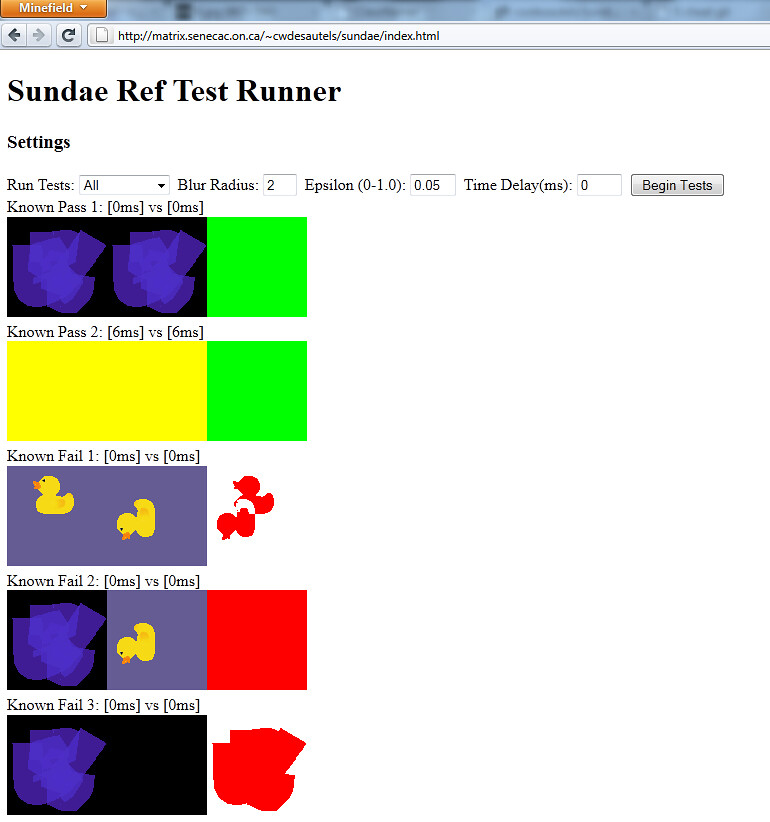
The other features I put in for these releases such as finally making the test tags working. Marking the end in an era where I had options on the front page of index.html that never did anything. Additionally getting to features that my one user so far wanted! Notes per test to display additional text during run time. Lastly, this option I spent a better part of Friday afternoon hacking together. Allowing the user to see the blurred pixel results on their original canvases as seen below.


Some Problems

I need help! Look at my thread pool in Sundae.js  I want each blurring to use its own worker thread. Right now the blur worker is blurring both canvases. I cannot not figure out how to get both of these threads running asynchronously and actually blurring the right canvases. If anyone has design advice drop a bug at lighthouse or comment below.

Friday, April 8, 2011

ECL500 - Drawsy

Dave Seifried and I created a simple paint application for the Blackberry. We made this application to be our culminating project in ECL500, the purpose of the course was to explore Eclipse as a development environment and ultimately use its tools to make something cool!

The Problems
 
An on going problem is combating the low frame rate environment. Since our draw function is called every frame often times a long sweeping motion leaves gaps because the motion took place between screen refreshes. Unfortunately this problem only gets worst the deeper our stack depth gets.

The Evolution
 
Originally we were going to port Processing to use RIM's awt implementation this proved to be quite the hassle, then we thought of using Processing.js, which was the reason I made this demo but the in ability to open local .html files and not wanting to rely on a network connection cut that dream short.

Either way here's your exclusive sneak peak at our demo.


Optimizations in the Works
  • Swipe the draw from the previous screen to the current
  • Draw on a back buffer
  • Better control of the screen stack

Sunday, March 27, 2011

pjs - fun - playing with a demo

The Demo

A few days ago, David Sefried linked me this demo.

The Hack

Because I don't own an IPad I ported over the demo to use with my mouse and my shiny new browser, Firefox 4!

I simply changed the touch event handling to mouse events, and where the multiple touch aspect became relevant I was forced to omit it. The code is available here on github. Just like the demo I used minified Processing.js, and both rewriting the code and fully understanding it was a breeze.

(function (w, undef) {
    var c, p, t, touches, go, 
    resize = function () {
        p.size(w.innerWidth, w.innerHeight);
    };
    w.touchStart = function (e) { touches = e; go = true; };
    w.touchMove = function (e) { if (go) touches = e; };
    w.touchEnd = function () { touches = go = undef; };
    w.orientationChange = resize;
    w.onload = function () {
        c = w.document.getElementById("art");
        p = new Processing(c, function (p) {
            p.setup = function () { p.background(255, 255, 230); }
            p.draw = function () {
                if (touches != undef) {
                    var r = (Math.sin(t) / 2.0 + 0.5) * 255;
                    var g = (Math.sin(t * 1.3) / 2.0 + 0.5) * 255;
                    var b = (Math.sin(t * 1.4) / 2.0 + 0.5) * 255;
                    p.noStroke();
                    p.fill(r, g, b);
                    t += 0.1;
                    p.ellipse(touches.pageX, touches.pageY, 300, 300);
                }
            }
        });
        t = 0;
        resize();
    };
})(window);


In Action

Click inside the canvas, and move your mouse around. The math that I do not understand takes care of the colour changing.


The Link

Here's the link to the hosted code, if you didn't read it off the URL.

Whats Next
 
I attempted to convert the code to generate a Mandelbrot fractals instead of just ellipses'. After no success so far I opted to upload working code. Thanks to Pomax in Pjs' irc channel for this link

Monday, March 7, 2011

ClassNamer

A change of pace from the usual javascript talk. A friend linked me this the other day, I thought it was genius at the time and its hilarity is now also heightened because of the fact that I didn't sleep last night thanks to work.

Behold:

http://www.classnamer.com/


Can't think of a class name sometimes? This is the link for YOU. it artfully selects arbitrary programming terms and commonly used words to make the most descriptive and utterly useless class names ever! I love it. This will surely benefit the community.

Sundae.js - 0.6 release

It seems like just last week I was coming at you with a release, well, I was. Just a little bit of recap.


What is it?

Sundae is a Canvas reference tester, for more information see my previous release. I want to provide the power and functionality for you to easily compare test cases of your Canvas using library! In preparation for this release I hosted the code on a web server graciously provided by Seneca to each student. To use this you need a WebGL compatible and enabled browser. Such as my personal favourite, Firefox's nightly.


Check it out

After you've obtained a browser got to my hosted page. If getting a whole new browser is a tall order, don't fret check out this screenshot!


Encouraging work:

Check out this blog for a sample of what type of library would use this testing framework. Andor has since helped by submitting tickets to improve the framework.


Available here:


How can you help?

Have a feature to add? Found a bug? Submit tickets at:

    Thursday, February 24, 2011

    Sundae.js - 0.5 release

    Another installation of the budding Canvas reference tester is out!

    What is it?
    Sundae is framework built to provide a visual pixel difference of rendered images in Html5 canvases. The focus was on providing the functionality to load an known good render result and a render result from your library.

    That way when changes are made to your rendering library you can see what the results are. The results come in the form of an exact pixel comparison, plus everything is rendered beside each other for easy visual discernment.

    Available here:

    How can you help?
    Have a feature to add? Found a bug? Submit tickets at:


    Changes in 0.5:
    • asynchronous reference canvas filling
    • JSON loading
    • Script loading
    • Basic use test suite


    Changes to come: 
    • Asynchronous library loading
    • No loading of duplicate library URL's
    • Updated API
    • Pixel Blurring
    • Less rigid test case requirements
    • Calibration test suite
    • Worker thread support

    Thursday, February 10, 2011

    Sundae.js - getting JSON files

    As with my previous post,

    Sundae.js uses a JSON file to control its test cases. I define a rigid API with the expected test case format, and a user fills out a JSON file at least suppling the required field. A sample of my valid JSON file can be found here.

    So in order to get a JSON file, or the contents of any file as a string you need to create a XMLHttpRequest() object. The Mozilla MDC provides detailed explanations of its attributes and expected uses and cautions.

    Here are the steps I followed to get this done for Sundae.js:

    1. Make a XMLHttpRequest() object.
    2. Set its open parameters
    3. Set its onload()
      1. Very handy for managing callback functions
      2. Also handy for using the objects responseText
    4. Set its send to null
    As usual here is a pastebin of getJSON, and there you have it. Alternatively if you aren't using valid JSON for JSON.parse(responseText) of your file, you should use eval("(" + responseText + ")").