Sunday, March 27, 2011

pjs - fun - playing with a demo

The Demo

A few days ago, David Sefried linked me this demo.

The Hack

Because I don't own an IPad I ported over the demo to use with my mouse and my shiny new browser, Firefox 4!

I simply changed the touch event handling to mouse events, and where the multiple touch aspect became relevant I was forced to omit it. The code is available here on github. Just like the demo I used minified Processing.js, and both rewriting the code and fully understanding it was a breeze.

(function (w, undef) {
    var c, p, t, touches, go, 
    resize = function () {
        p.size(w.innerWidth, w.innerHeight);
    };
    w.touchStart = function (e) { touches = e; go = true; };
    w.touchMove = function (e) { if (go) touches = e; };
    w.touchEnd = function () { touches = go = undef; };
    w.orientationChange = resize;
    w.onload = function () {
        c = w.document.getElementById("art");
        p = new Processing(c, function (p) {
            p.setup = function () { p.background(255, 255, 230); }
            p.draw = function () {
                if (touches != undef) {
                    var r = (Math.sin(t) / 2.0 + 0.5) * 255;
                    var g = (Math.sin(t * 1.3) / 2.0 + 0.5) * 255;
                    var b = (Math.sin(t * 1.4) / 2.0 + 0.5) * 255;
                    p.noStroke();
                    p.fill(r, g, b);
                    t += 0.1;
                    p.ellipse(touches.pageX, touches.pageY, 300, 300);
                }
            }
        });
        t = 0;
        resize();
    };
})(window);


In Action

Click inside the canvas, and move your mouse around. The math that I do not understand takes care of the colour changing.


The Link

Here's the link to the hosted code, if you didn't read it off the URL.

Whats Next
 
I attempted to convert the code to generate a Mandelbrot fractals instead of just ellipses'. After no success so far I opted to upload working code. Thanks to Pomax in Pjs' irc channel for this link
Monday, March 7, 2011

ClassNamer

A change of pace from the usual javascript talk. A friend linked me this the other day, I thought it was genius at the time and its hilarity is now also heightened because of the fact that I didn't sleep last night thanks to work.

Behold:

http://www.classnamer.com/


Can't think of a class name sometimes? This is the link for YOU. it artfully selects arbitrary programming terms and commonly used words to make the most descriptive and utterly useless class names ever! I love it. This will surely benefit the community.

Sundae.js - 0.6 release

It seems like just last week I was coming at you with a release, well, I was. Just a little bit of recap.


What is it?

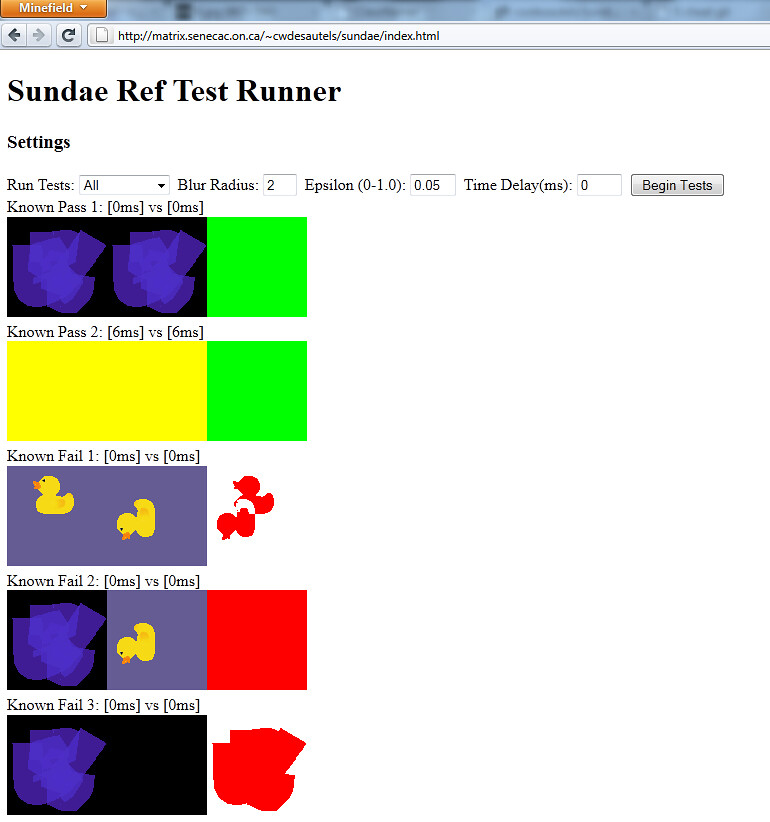
Sundae is a Canvas reference tester, for more information see my previous release. I want to provide the power and functionality for you to easily compare test cases of your Canvas using library! In preparation for this release I hosted the code on a web server graciously provided by Seneca to each student. To use this you need a WebGL compatible and enabled browser. Such as my personal favourite, Firefox's nightly.


Check it out

After you've obtained a browser got to my hosted page. If getting a whole new browser is a tall order, don't fret check out this screenshot!


Encouraging work:

Check out this blog for a sample of what type of library would use this testing framework. Andor has since helped by submitting tickets to improve the framework.


Available here:


How can you help?

Have a feature to add? Found a bug? Submit tickets at:

    Thursday, February 24, 2011

    Sundae.js - 0.5 release

    Another installation of the budding Canvas reference tester is out!

    What is it?
    Sundae is framework built to provide a visual pixel difference of rendered images in Html5 canvases. The focus was on providing the functionality to load an known good render result and a render result from your library.

    That way when changes are made to your rendering library you can see what the results are. The results come in the form of an exact pixel comparison, plus everything is rendered beside each other for easy visual discernment.

    Available here:

    How can you help?
    Have a feature to add? Found a bug? Submit tickets at:


    Changes in 0.5:
    • asynchronous reference canvas filling
    • JSON loading
    • Script loading
    • Basic use test suite


    Changes to come: 
    • Asynchronous library loading
    • No loading of duplicate library URL's
    • Updated API
    • Pixel Blurring
    • Less rigid test case requirements
    • Calibration test suite
    • Worker thread support