Thursday, August 4, 2011

BerrySync: Fetcher.java, now with more github

after a little bit of work ironing out the BerrySync app. Ive shlapped together my synchronization service library. I've dubbed it fetcher.java, now on github.


My Design

I created the library to be as modular as I could, I'm not happy with the results yet but this is the first step after all.

The Fetcher class is a singleton and in order to be used it requires a service to be set, this service must be of the iFetcher interface. That allows me to hotswap or customize the service that I'm using.

On top of that each service can have a different structure or set of needs, so attached to the iFetcher interface are setters for the seperate modules:
  • Encryption module
  • Json decoding module
  • Network connector module

This Release

 I've implemented the bare minimum required steps for FireFox's Sync service. My chosen platform was BlackBerry(obviously), and as a result the modules contain platform specific code. Meaning that different modules will need to be created to port this service to different platforms.


What Can I Do?

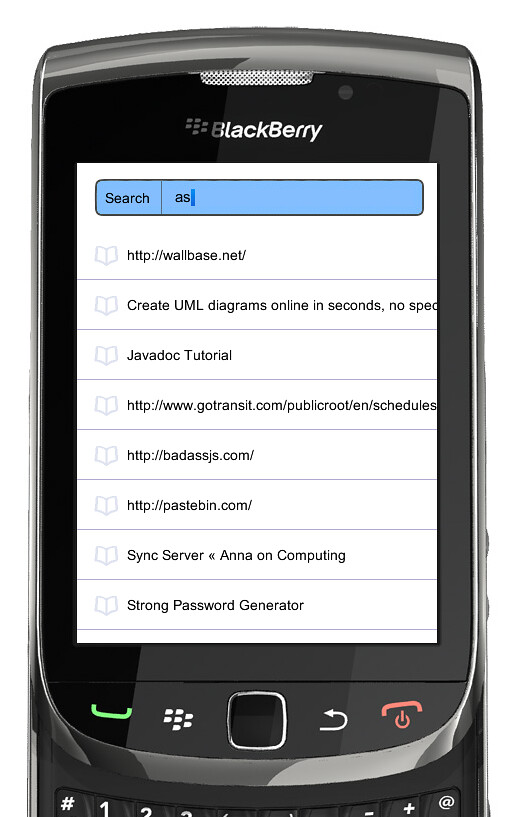
Fetcher.getInstance().setLogin("asdf","asdf","asdf").pull();
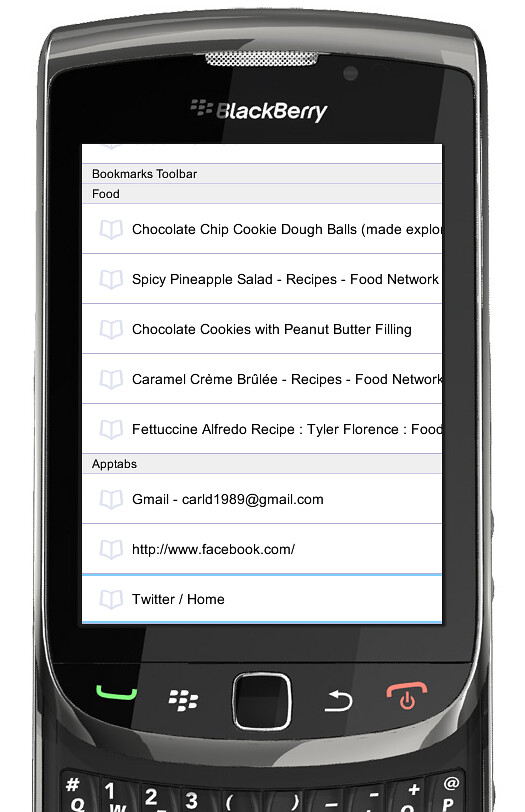
< This screenshot is the alpha visual representation of data pulled by Fetcher >
1,  2.


Thursday, July 21, 2011

BerrySync: Untested code is broken code

TLDR - What did I learn?

In the irc channels I lurk, a phrase reigns true. "Untested code is broken code". I overlooked this bug because my tests didn't keep up with the code. Don't be lazy, you will not remember you took short cuts a month ago.


BerrySync's Show Stopper
 
So I'm very quick to point fingers, So naturally when our program stops decrypting 75% of the I went straight to http://bit.ly/r9vKFS. You should note RIM is abiding by this document http://bit.ly/ey4Fg and if you read further down you'll note that this algorithm padding standard does not mention AES encryption which is tragic because its the only symmetric key unformatter engine that RIM supplies, meaning you'll need it for AES encryption! For example BerrySync's crypto module sans error control:

AESKey key = new AESKey(keyData);
InitializationVector iv = new InitializationVector(ivData);
ByteArrayOutputStream outputStream = new ByteArrayOutputStream();
BlockEncryptor encryptor = new BlockEncryptor(
     new PKCS5FormatterEngine(
          new AESCBCEncryptorEngine(key, iv)), outputStream);
encryptor.write(plainText);
encryptor.close();
outputStream.close();
return outputStream.toByteArray(); 

I And you should check out http://bit.ly/rplM0s. Here you'll see that Mozilla is abiding to http://bit.ly/piPqcJ. The 2.1 standard includes AES encryption in the spec, hold on a minute. RIM must be doing something totally off the wall here. All of that combined with the knowledge that using third party and unlicensed encryption and getting your app into AppWorld would involve many headaches and much money ala ECCN.


Wrong

As with most things my finger pointing was wrong, the bug actually lived on this line
data = data.replace('-', '\0'); 
Where my lazy attempt at removing characters from a string totally backfired. The interesting thing is that during rare cases, my sync account and about 25% of others tested it didn't actually make a difference and everything worked as intended. Where the other 75% of accounts saw a Bad Padding Exception during decryption.

Wednesday, July 6, 2011

BerrySync: How fetcher gets it done, thread pooling

A Little Bit Of Background
I designed My fetcher library to have modules, these house the logic for the various steps I would need to perform. The fetcher itself links up the modules and goes from a url to a usable object for BerrySync.

One of the more troublesome modules was the Smuggler, I originally designed smuggler to do the network scheduling for fetcher then Smugglers worker thread would perform the actual connections, making the operation non-blocking(which is important for a good user experience!).

Now
I was forced to change the design, because the data parsing and decryption had to moved off the main thread. To facilitate this I gave Fetcher its own internal work Queue, with the smuggler still scheduling the network connections this time using Fetchers new and improved .invokeLater(runnable r) method!


public void invokeLater(Runnable work){
_queue.enQueue(work);
}
private final class WorkQueue {
        private Node _head;
        private Node _tail;
        private QueueWorker[] _worker;
        public WorkQueue(){...} 
        public synchronized void enQueue(Runnable data) {...}
        private synchronized Runnable deQueue() 
throws InterruptedException{...}
        private final class QueueWorker extends Thread {
            public void run() {
                Runnable work = null;
                while (true) {
                    try {
                        work = deQueue();
                        work.run();
                    }
                    catch (InterruptedException ignored) {}
                }
            }
        }
    } 

I'm using the runnable interface to formalize how this thread can 'run' your work. The commented out methods just show a simple queue linked list data structure.

Tune In Next Time
In the next instalment I'll tell you all about how I'm tracking down an elusive decryption bug with sync data on the BlackBerry!

Wednesday, June 22, 2011

BerrySync: Launching Opera mini xor BlackBerry's Native Browser

An important part of BerrySync will be actually opening up URLs in the browser(s) on your BlackBerry.
After doing a little research I worked out how to not only open the native browser but third party browsers as well.

Opening Native Browser

browserSession = Browser.getDefaultSession();
browserSession.displayPage("http://www.BlackBerry.com");
browserSession.showBrowser(); 

Wasn't that painless and easy?

Opening 3rd Party Browsers, Opera Mini in this case
Also worthy of note is that fact that this block of code doesn't stop at just browser, you can invoke any third party app by replacing "Opera Mini" or making another if clause. See below or Pastebin.

int[] apps = CodeModuleManager.getModuleHandles();
ApplicationDescriptor[] ad;
ApplicationDescriptor holder;
String[] args = {"google.com"};
for(int i = 0, len = apps.length; i < len; i ++){
    ad = CodeModuleManager.getApplicationDescriptors(apps[i]);
    if(ad != null){
        for(int j = 0, adlen = ad.length; j < adlen; j++){
            if(ad[j].getName().equals("Opera Mini")){
                holder = new ApplicationDescriptor(ad[j], args);
                try {
                    ApplicationManager.getApplicationManager().runApplication(holder);
                    break;    //Needed
                } catch (ApplicationManagerException failedToOpen) {}
            }
        }
    }
} 


Code Walkthrough
This code scans through all installed modules on a BlackBerry, it tries to get the application descriptor on each and verifies it against the name of the app you wish to run. The args step is optional, but for our purposes we want to open Opera and goto the specified URL. Lastly the break is needed to stop multiple instances of the app opening since I found that many apps had more then one matching application descriptor